Installing the Standalone Version
Windows
Download Monochrome.exe from the latest release and run it. You may need to install Microsoft Visual C++ Redistributable 2019 if you get an error about missing VCRUNTIME140_1.dll.
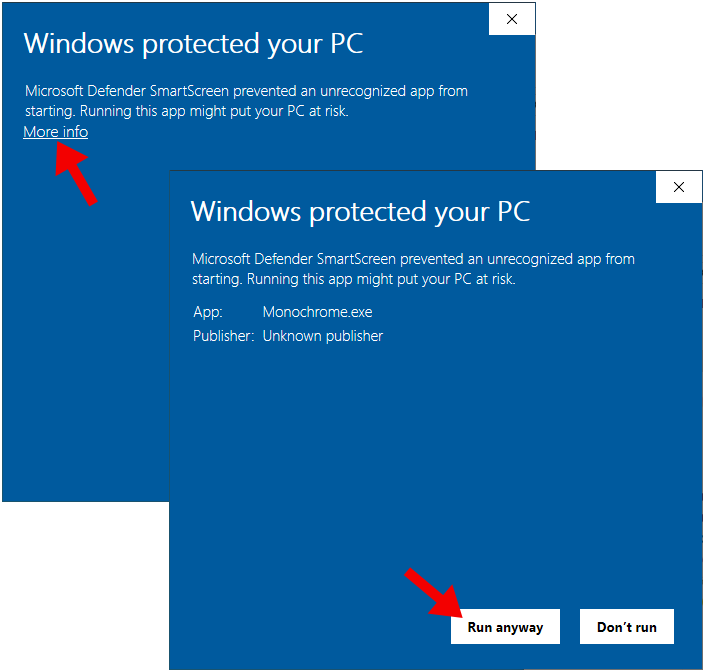
Because Monochrome is not digitally signed, Windows Defender might show a warning when you try to launch it. This is normal. To proceed, click on “More info” and then “Run anyway”.
macOS
Download the .dmg file from the latest release and run it to copy Monochrome.app to your Applications folder. When launching Monochrome for the first time, you may need to right-click on the app in Finder and select “Open” to bypass the security warning. This is because the app is not notarized by Apple, which is a requirement for apps distributed outside of the Mac App Store. If the warning persists, you can remove the quarantine attribute from the app by running the following command in Terminal:
xattr -d com.apple.quarantine /Applications/Monochrome.app
For more information, see the “open a Mac app from an unidentified developer” guide from Apple.
Linux
Download the .AppImage file from the latest release and run it. You may need to mark the file as executable, see the AppImage documentation for more information.